Pear Presser Play now

Pressthe pear!

A free, family-friendly clicker for all ages. Squeeze out Pear Juice, grow your orchard and follow a story through ten worlds and 200 levels.

  • Nothing to download
  • Phone, tablet or computer
  • Saves as you play

Go on, give it a squeeze.

Ten worlds to squeeze through

Each world has 20 levels, its own moving scenery and one pear hidden somewhere in the picture. Finish all ten and the levels carry on for ever.

  1. Sunny Orchard

    Green rows, warm sun and the first drops of juice.

    Levels 1 to 20
  2. Tropical Paradise

    Palms, waterfalls and pears that taste of holiday.

    Levels 21 to 40
  3. Candy Kingdom

    Sugar hills and lollipop trees in pastel light.

    Levels 41 to 60
  4. Frozen Peaks

    Crystal air, blue ice and pears that ring like glass.

    Levels 61 to 80
  5. Volcanic Valley

    Molten rivers under an orange sky.

    Levels 81 to 100
  6. Enchanted Forest

    Glowing mushrooms, fireflies and old magic.

    Levels 101 to 120
  7. Neon City

    Holograms, rain-slick light and electric juice.

    Levels 121 to 140
  8. Cloud Kingdom

    Floating islands above a golden sea of cloud.

    Levels 141 to 160
  9. Cosmic Galaxy

    Planets, nebulae and pears made of starlight.

    Levels 161 to 180
  10. Pear Dimension

    Where every portal leads to more pear.

    Levels 181 to 200

Twelve pears to earn

Finish worlds and story quests to unlock new pears. Each one looks different and gives a small bonus.

  • Classic Green Pear

    Yours from the start.

  • Golden Pear

    Finish Sunny Orchard.

  • Crystal Pear

    Finish Candy Kingdom.

  • Frost Pear

    Finish Frozen Peaks.

  • Magma Pear

    Finish Volcanic Valley.

  • Rainbow Pear

    Finish Cloud Kingdom.

  • Cosmic Pear

    Finish Cosmic Galaxy.

  • Mythic Pear

    Finish Pear Dimension.

  • Tropical Pear

    Story quest "The Tropical Mystery".

  • Sugar Pear

    Story quest "The Duchess Decides".

  • Neon Pear

    Story quest "Encore".

  • Legend Pear

    Story quest "The Ultimate Squeeze".

PearArcade

Five arcade machines open as you level up. Each run costs one or two tickets and pays out by medal: Bronze, Silver, Gold or Diamond. You earn tickets as you play, and a free boost can add one.

  • Perfect Press

    Stop the needle in the perfect-pressure zone. Then twice. Then three times.

    Opens at level 10
  • Pear Drop

    Catch falling fruit in your basket. Dodge everything rotten.

    Opens at level 30
  • Juice Rush

    Tap pears before they vanish. Five hearts, forty seconds, shrinking windows.

    Opens at level 55
  • Orchard Match

    A three-stage puzzle: score, break the ice, then clear the honey.

    Opens at level 85
  • Pear Expedition

    Lead an expedition through three wild regions. Manage hearts, supplies and nerve.

    Opens at level 120

Who is singing the wrong note?

The Pear Kingdom runs on a Hum, the sound of its juice energy, and the Hum has gone off-key. Granny Bartlett wants it fixed before lunch.

Follow a trail of Tuning Shards from the orchard to the stars, and meet a new friend in every world.

  • 103 quests to finish
  • 10 story chapters
  • 11 characters to meet
  • 9 hidden quests
Start the story
  • Granny Bartlett

    Keeper of the Sunny Orchard

  • Pip

    Captain of the Helpful Ants

  • Professor Quince

    Measures everything

  • Captain Seckel

    Explorer of the fizzy seas

  • Duchess Anjou

    Ruler of the Candy Kingdom

  • Brother Bosc

    Monk of the Frozen Peaks

  • Ember

    Smith of the Volcanic Valley

  • Willow

    The oldest tree in the forest

  • Volt

    The loudest DJ in Neon City

  • Lady Cirrus

    Archivist of the Cloud Court

  • ???

    A very old, very small voice

Straight from the game

These are real screens. All the pictures are drawn by the game as you play, and so is the sound.

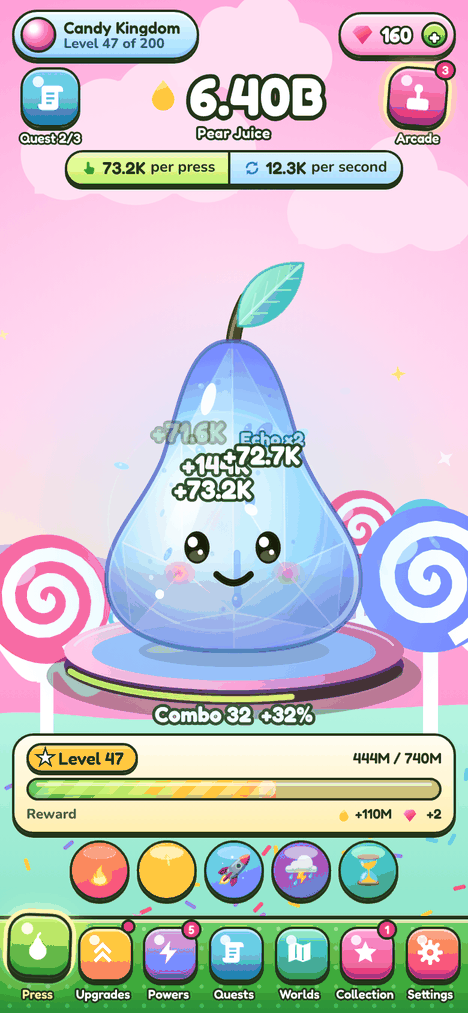
The Crystal Pear being pressed in the Candy Kingdom, with juice numbers flying off it.
Travel to new worlds
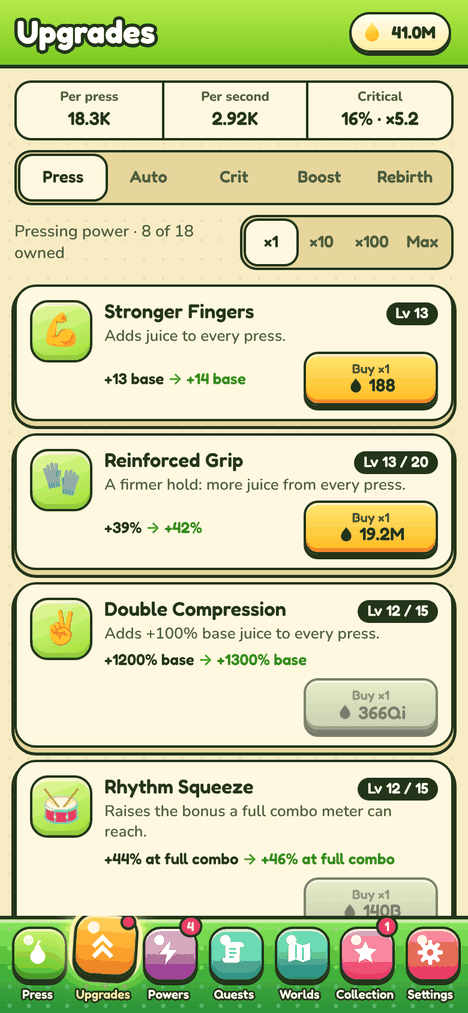
The Upgrades screen listing Stronger Fingers, Reinforced Grip, Double Compression and Rhythm Squeeze.
Buy 60 upgrades
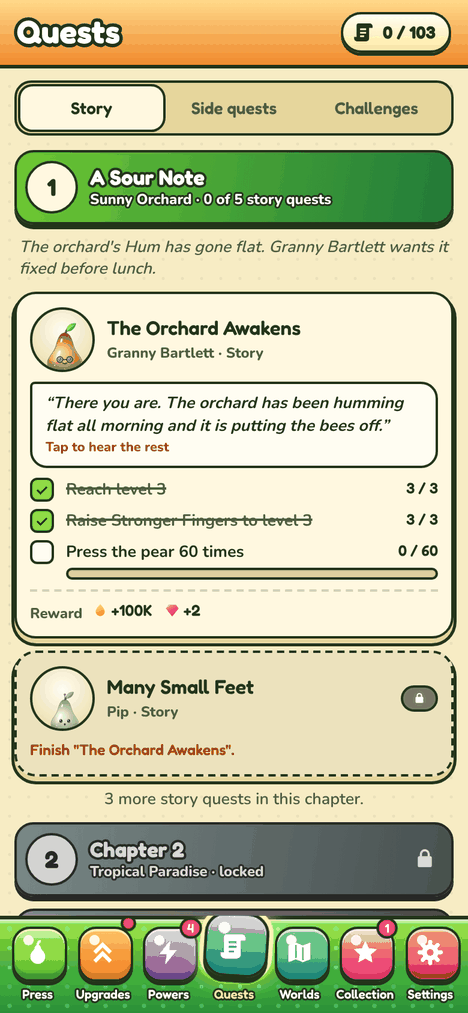
The Quests screen showing chapter one, A Sour Note, with Granny Bartlett asking for help.
Follow the story
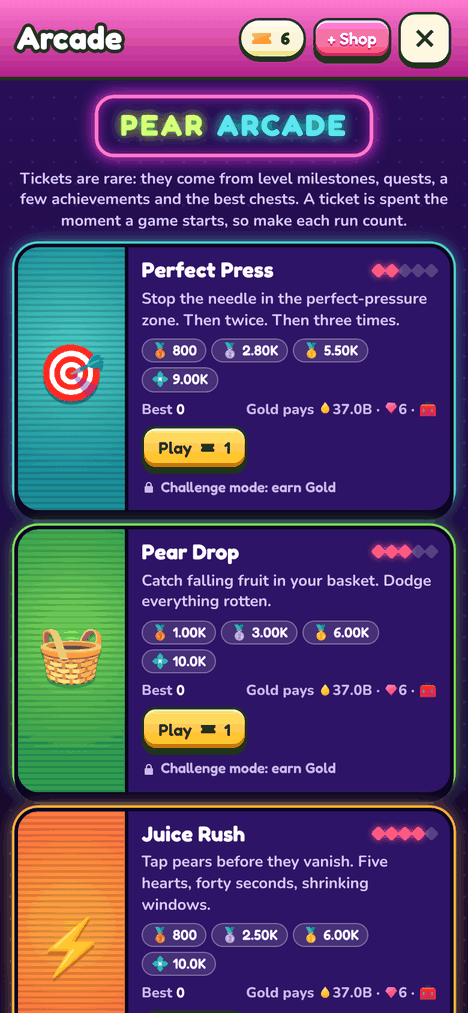
The Pear Arcade lobby with the Perfect Press, Pear Drop and Juice Rush machines.
Win medals in the arcade

Play anywhere

  • Any screen

    Made for phones first. Works just as well on a tablet, a laptop or a big desktop screen.

  • Nothing to install

    It runs in your browser. No download, no account, no sign-up.

  • Saves by itself

    Your progress is kept on this device, and your orchard keeps making juice while you are away.

  • Works offline

    After your first visit it plays without a connection. Add it to your home screen to open it like an app.

Good to know for parents and families

Pear Presser is built so that anyone in the house can play it without surprises.

Read the family guide
  • Completely free. There is nothing to buy.
  • No ads of any kind.
  • No chat, no accounts and no sign-up.
  • Progress is stored on your own device.
  • No pressure: no countdowns, no “limited time” offers, no pop-up sales.

Questions people ask

Is it free?

Yes. You can play all ten worlds, every quest and every arcade game without paying anything.

There is nothing to buy and there are no ads.

Do I need to install anything?

No. Pear Presser runs in your web browser. Press Play now and it starts. There is no download, no account and no sign-up.

Does it work on phones?

Yes. It was made for phones first and also works on tablets, laptops and desktop computers. Tap the pear on a touch screen, click it with a mouse, or press Space or Enter on a keyboard.

How do I save?

You do not have to do anything: the game saves by itself, in this browser, on this device.

To make a backup or move to another device, open Settings in the game and use Export, then Import on the other device. If you clear your browser's site data the save is deleted, so export first.

Is it family-friendly?

Yes. There is no chat, no accounts and nothing to sign up for. There is nothing to buy and there are no ads.

The page for parents and families explains everything in plain words.

What ages is it for?

All ages. The story is easier to enjoy if you can read or have someone to read it with you.

Can I play offline?

Yes. After your first visit the game keeps working without a connection.

You can also put it on your home screen so it opens like an app. On an iPhone or iPad, open the game in Safari, tap the Share button, then “Add to Home Screen”. On Android, open the browser menu and choose “Install app” or “Add to Home screen”.

Know someone who would love a good squeeze?

Send them the game. It is free and there is nothing to install.